
Downloads
Quality profiles
Choose which release qualities Fliks may download for a title, how they rank, and when it stops looking for something better.
A quality profile says which release qualities Fliks may download for a title and when it stops looking for something better. Needed only for requests or Torrent manager: playback never reads it. Create one in Settings > Quality profiles: a name, a cutoff, and the qualities you accept.
Create a quality profile#
Settings > Quality profiles (Media section of the admin sidebar, Settings access permission). Every searched title carries one profile: chosen when it is added or requested, defaulting to the library's (see Libraries), changeable from the title page (Profiles). A title with no quality profile is never searched for.
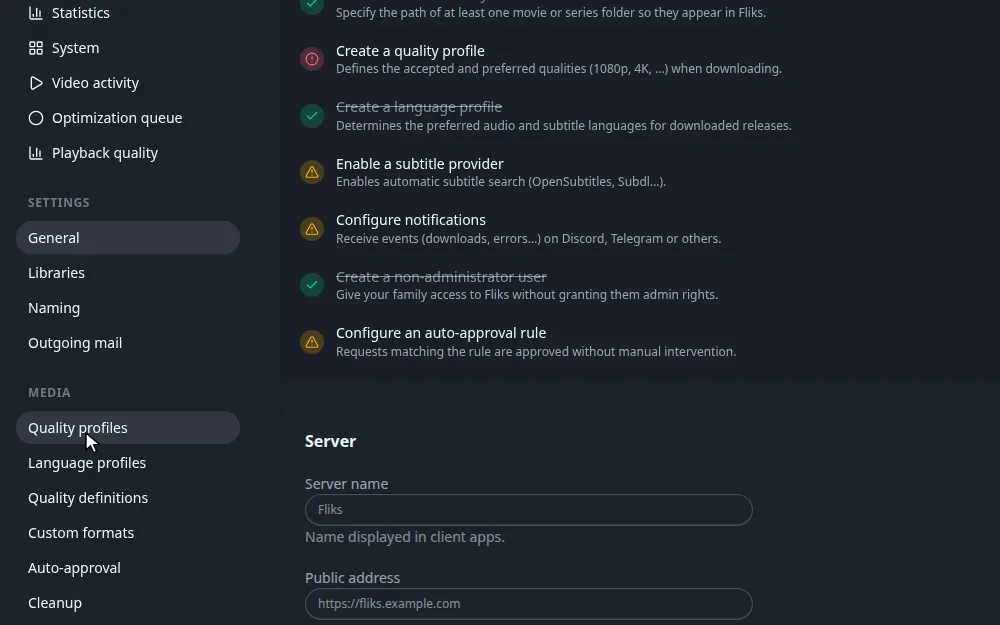
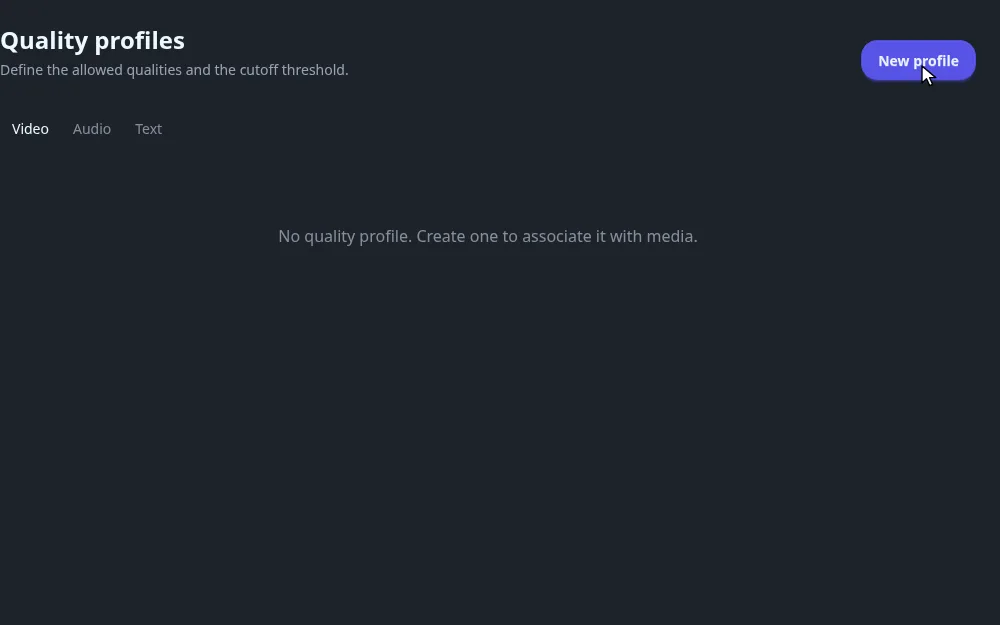
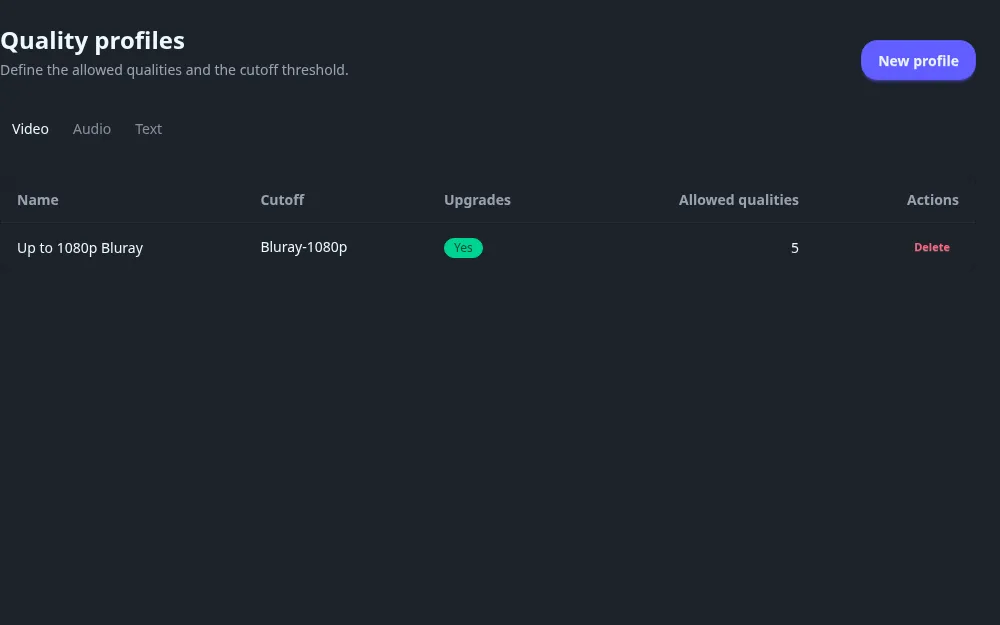
To change a profile, click its name. To remove it, click Delete and confirm.
Deleting a profile that titles, libraries or requests still use does not fail. Those titles silently lose their profile and are no longer searched for until you give them another one.
The three tabs at the top list the profiles of each family: Video, Audio or Text (books and comics). This page is written for Video.
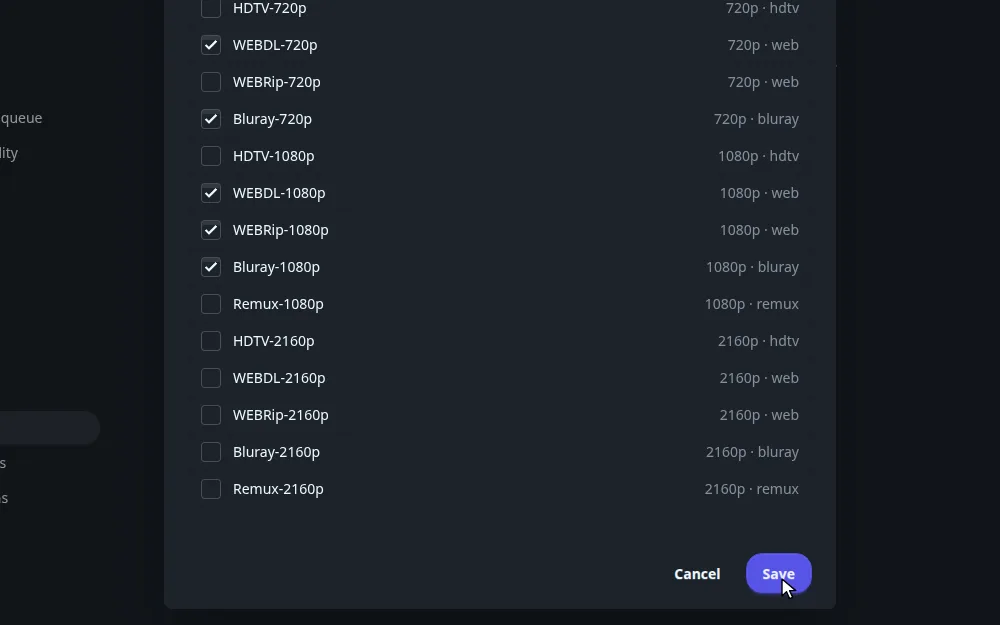
Tick at least one quality before saving, or nothing will ever match. The Cutoff quality is where Fliks stops upgrading once a file is on disk.
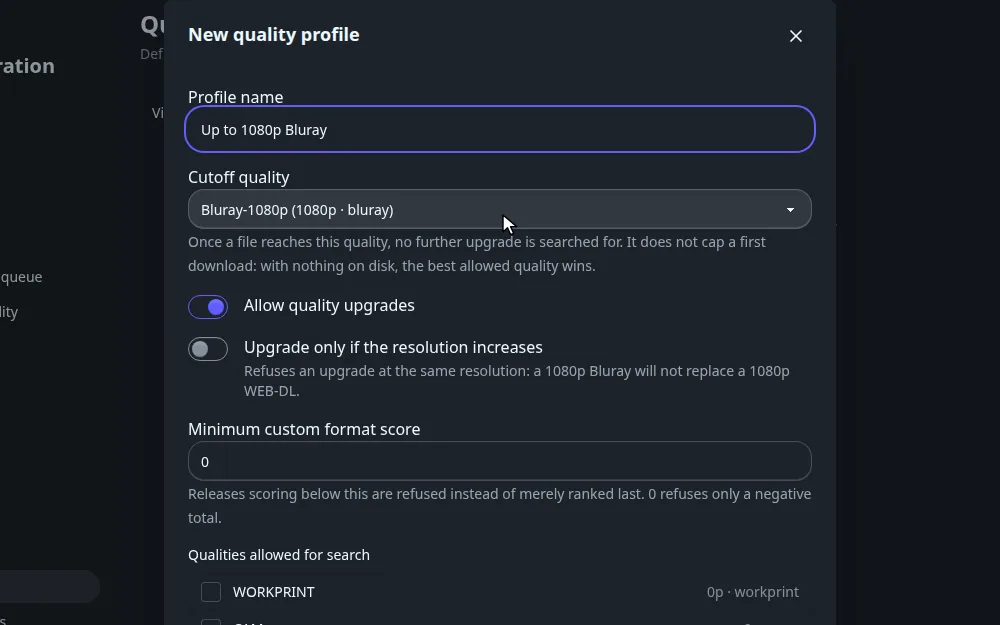
Every field of the form
| Field | What it does |
|---|---|
| Profile name | The label shown in pickers. Required. Names do not have to be unique. |
| Cutoff quality | The quality at which Fliks stops upgrading. New profiles start on the highest quality of the family. See the fold How the cutoff works below. |
| Allow quality upgrades | On by default. When on, a title that already has a file keeps being searched for a better release, up to the cutoff. When off, a title with a file is never searched again. |
| Upgrade only if the resolution increases | Video only, shown when upgrades are on. Refuses an upgrade at the same resolution: a 1080p Bluray will not replace a 1080p WEB-DL. |
| Minimum custom format score | Releases whose total custom format score is below this number are refused, not just ranked last. Default 0, which refuses only a negative total. |
| Qualities allowed for search | One checkbox per quality, with its resolution and source on the right. A release whose quality is unticked is refused. A new profile starts with nothing ticked, so tick at least one quality before saving or nothing will ever match. |
How qualities rank, and how a release is chosen
There is no separate "preferred" setting. Qualities are ranked by a fixed built-in order, and among the releases a profile accepts, the higher rank always wins. You choose which qualities are allowed; Fliks picks the best allowed one.
| Rank | Qualities (lowest to highest) |
|---|---|
| 5 to 12 | WORKPRINT, CAM, TELESYNC, TELECINE (no resolution) |
| 18 to 30 | DVD, DVD-R, SDTV, WEBDL-480p, WEBRip-480p, Bluray-480p |
| 40 to 50 | HDTV-720p, WEBDL-720p, WEBRip-720p, Bluray-720p |
| 55 to 72 | HDTV-1080p (55), WEBRip-1080p (60), WEBDL-1080p (62), Bluray-1080p (68), Remux-1080p (72) |
| 75 to 95 | HDTV-2160p (75), WEBRip-2160p (80), WEBDL-2160p (82), Bluray-2160p (88), Remux-2160p (95) |
A higher resolution always outranks a lower one, and inside one resolution the order is HDTV, WEBRip, WEBDL, Bluray, Remux. Equal ranks (WEBDL-720p and WEBRip-720p, for instance) are told apart by the custom format score, then by seeders and size.
When Fliks looks at the releases found for a title, it:
- Refuses those that break a rule: quality not ticked, custom format score under the minimum, size outside the quality definition, audio language not in the language profile, blocklisted, wrong title, year or episode.
- Sorts the rest by rank, then by custom format score, then by swarm health and closeness to the preferred size.
- Takes the first one. Refused releases are sorted last and are never grabbed automatically; you can still grab one by hand after a confirmation ("Download anyway?").
How the cutoff works
The cutoff only matters once a file is on disk.
| Situation | What Fliks does |
|---|---|
| Nothing on disk | Takes the best allowed release. The cutoff does not cap this first download: if a 2160p quality is ticked and available, it wins even with a 1080p cutoff. |
| A file below the cutoff, upgrades on | Looks for releases ranked above the file and no higher than the cutoff. Anything above the cutoff is refused. |
| A file at or above the cutoff | Stops searching. |
| Upgrades off | Stops searching as soon as there is a file. |
Ranks are compared, not resolutions. With the cutoff on Bluray-1080p (68) and a file at WEBDL-1080p (62), only Bluray-1080p is an upgrade. Remux-1080p (72) is above the cutoff and refused.
With Upgrade only if the resolution increases on, an upgrade must also have a strictly higher resolution than the best file on disk, so a 1080p file is only replaced by 2160p.
Worked example: up to 1080p Bluray
Goal: good 1080p files, upgraded to Bluray when one appears, and no 4K.
- Profile name:
Up to 1080p Bluray. - Cutoff quality:
Bluray-1080p. - Allow quality upgrades: on. Upgrade only if the resolution increases: off.
- Minimum custom format score: 0.
- Allowed: Bluray-720p, WEBDL-720p, WEBDL-1080p, WEBRip-1080p, Bluray-1080p. No 2160p quality is ticked.
What happens:
- A title with no file: the best allowed release wins, so a Bluray-1080p beats a WEBDL-1080p.
- Only a WEBDL-720p is available, so Fliks downloads it. Later a WEBDL-1080p appears, which ranks higher and is at or below the cutoff, so it replaces the 720p file.
- Once a Bluray-1080p is on disk the cutoff is reached and the title is no longer searched.
- A 2160p release is refused all along, because its quality is not ticked.
To allow 4K but keep 1080p as the target for existing files, tick the 2160p qualities and leave the cutoff on Bluray-1080p. A first download then takes the 4K release if one exists. To keep 4K out, leave it unticked.
Audio and text families
The Audio and Text tabs use the same form with their own quality lists. Video-only options are hidden.
| Family | Qualities (lowest to highest) |
|---|---|
| Audio | Unknown, then MP3, Vorbis, AAC and Opus at 64k, 128k and 256k, then Lossless 16 bit and Lossless 24 bit. At the same bitrate, Opus ranks above AAC, Vorbis and MP3. |
| Text | Unknown, PDF, MOBI, AZW3, EPUB. |
A book or album want that has no profile of its own accepts every quality of its family. Comics use their own family, which has no profile page.
How it connects#
- Quality definitions set the size limits per quality that every profile shares.
- Custom formats add or subtract points on a release. They are global: the scores apply to every profile, and each profile only sets the minimum it tolerates.
- Language profiles are chosen alongside a quality profile and filter audio languages.
- Libraries store a default quality profile used when none is chosen.
- Requests carry a quality profile. A video request cannot be made without one.
- Downloads decides how often titles are searched. The search itself is done by the download plugin.