
Built-in plugins
Music
MusicBrainz, Fanart.tv and LRCLIB (bundled), and Music lists (catalogue): albums, artwork, lyrics and followed lists.
MusicBrainz, Fanart.tv and LRCLIB are bundled and need nothing: they identify albums, supply artwork and fetch lyrics. The Music lists plugin (catalogue) follows your lists on ListenBrainz, Last.fm, Spotify, Deezer or MusicBrainz and wants their albums or tracks.
Metadata plugins are configured from Settings > Metadata; Music lists has its own section in the Administration sidebar (see Overview). The three bundled providers do different jobs, so their order matters little: MusicBrainz identifies, Fanart.tv supplies images, LRCLIB supplies lyrics (ordered on Settings > Lyrics).
MusicBrainz#
Album, release and artist metadata from MusicBrainz. Provides:
- search by free text, MusicBrainz id or musicbrainz.org URL, re-ranked by exact title, primary type (album, EP, single), number of releases and, when ListenBrainz answers, popularity;
- artist and recording search;
- release groups, their releases and each release's tracklist, with performer, conductor, composer and lyricist credits;
- an artist's discography, and lookups from a Spotify or Deezer album id or an ISRC;
- genres, most voted first;
- cover art from the Cover Art Archive (500 px front cover);
- the week's most listened albums, artists and recordings from ListenBrainz (trending).
Settings:
| Field | Default | Notes |
|---|---|---|
| Base URL | Empty, which uses https://musicbrainz.org |
A mirror on your own network works, and must allow one request per second. |
| ListenBrainz token | Empty | Optional. Create one at listenbrainz.org/settings. It only raises ListenBrainz's rate limit for album and track popularity. Anonymous calls work without it. |
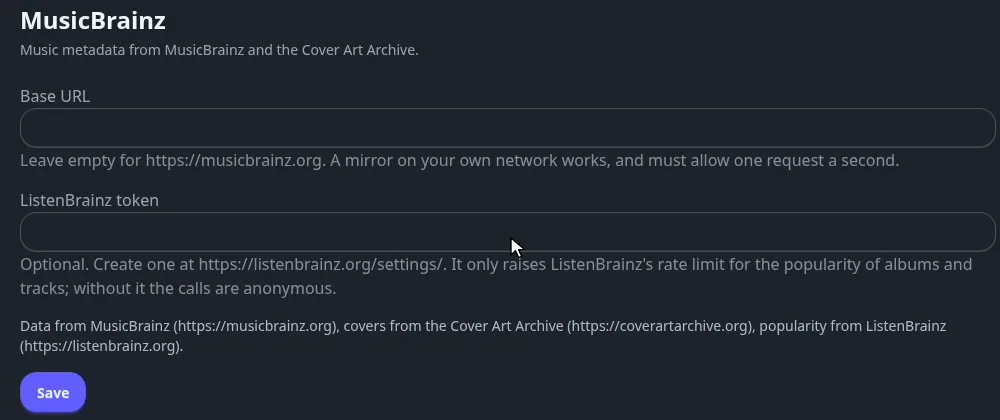
No account is needed. Limit: one request per second, so a big library import takes time.
Fanart.tv#
Artist images and album covers from Fanart.tv, keyed by MusicBrainz ids: an artist's thumbnail and the most liked cover of a release group.
Settings:
| Field | Default | Notes |
|---|---|---|
| API key | Empty, which uses the project key Fliks ships | Optional. Type your own to use it instead. |
| Personal key | Empty | Optional. Your Fanart.tv personal API key, sent with every request. |
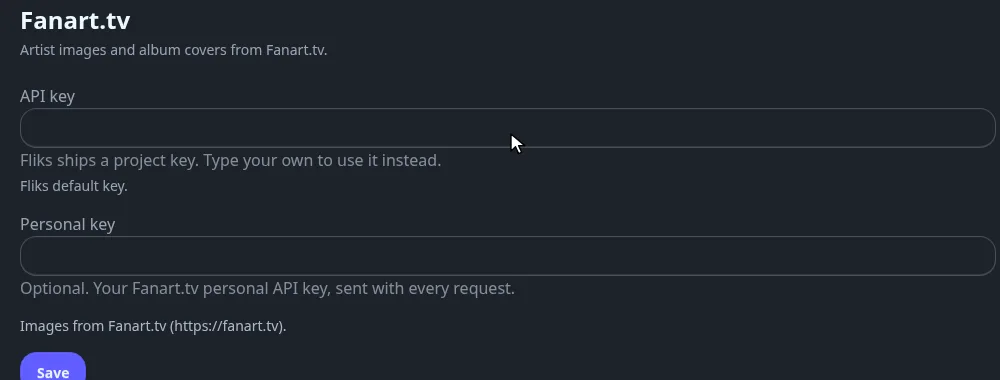
Limit: two requests per second. Results are kept for 30 days. Fanart.tv asks for attribution: the settings page carries it.
LRCLIB#
Synced and plain lyrics from LRCLIB, matched on title, artist, album and duration (within 2 seconds). You get synced lyrics when there are any, plain text otherwise. An instrumental track gives an empty result.
No account, no key and no settings. Turn fetching on with Settings > Lyrics: Automatic
fetch asks for the lyrics of every new track, and Write fetched lyrics next to the track saves
.lrc files. See Music for the player side.
Limit: 1.5 requests per second.
Music lists#
Catalogue plugin. It follows albums and tracks kept on other services and acts on the entries it has not seen yet. A job, Sync the music lists, reads every enabled list every six hours. Sync now on a list runs it at once.
Each list has a source and an action:
| Source | Lists you can follow | Credentials |
|---|---|---|
| ListenBrainz | A playlist, playlists made for you, top albums, top tracks, loved tracks | User name, optional token |
| Last.fm | Loved tracks, top tracks (only those carrying a recording id) | User name, API key |
| Spotify | A playlist, saved albums, saved tracks | Your own client id and secret |
| Deezer | A public playlist, favourite albums | None |
| MusicBrainz | A public collection of release groups or recordings | None |
| Action | Effect |
|---|---|
| Want the albums | Adds each album to the library as wanted, by its MusicBrainz, Spotify or Deezer id. |
| Want the tracks | Wants each track: the album is created and only that track is monitored. |
| Mirror into a playlist | Keeps a playlist named like the list, owned by the user who saved it, with the tracks your library already holds. |
Use Test on a list to check that it can be read before saving.
Entries without an id Fliks can resolve (a Last.fm track with no recording id, a Spotify track with neither ISRC nor album) are skipped: the plugin never matches on a title. Artists are not followed.
Spotify needs one extra step. Register
https://YOUR-FLIKS/api/plugins/fliks.musiclists/spotify/callback as a redirect URI of your own
Spotify app, save the list, then open
https://YOUR-FLIKS/api/plugins/fliks.musiclists/spotify/LIST-ID/authorize once in a browser.
Credentials are stored as secrets. The plugin needs the permissions to read and create media and to write playlists, shown on the consent screen at install.