
Administration
Metadata settings
The Settings > Metadata page, provider by provider: what each one supplies, how to configure it and how the lookup order works.
Settings > Metadata lists the metadata providers and the order they are asked. A watch-only setup can ignore it: the defaults work. Open it to paste your own TMDB key or to reorder providers.
Settings > Metadata lists every metadata provider installed on the server, what kind of media each one covers, and the order in which they are asked. How the data is used (matching, refreshing, fixing a wrong match) is in Metadata. The default language and region are on General.
Configure a provider#
Open Settings > Metadata in the administration sidebar (under Media) and click Configure on the row of a provider that has settings, here TMDB. The provider's own page opens, with its settings and a Save button.
The Providers table#
The Providers table and the default providers
| Column | Meaning |
|---|---|
| Provider | The provider's name, as its plugin declares it. |
| Kinds | What it can supply: movie, series, book, album. |
| Namespaces | The identifier family it owns (tmdb, tvdb, musicbrainz, audible...). An identified title stores one id per namespace. |
| Configure | Only shown when the provider has settings. It opens that provider's page. |
On a fresh install the table lists TMDB and TheTVDB (movies and series), TheXEM scene numbering (series), MusicBrainz, Fanart.tv and LRCLIB (albums), and Audible, Audnexus, BnF, Google Books and OpenLibrary (books). A provider added by a plugin appears here as soon as the plugin runs. If none is installed the page says No metadata provider installed.
Provider settings#
- TMDB: an API key field. Leave it empty to use the key Fliks ships with. Paste your own key if you hit the shared key's rate limits.
- TheTVDB, MusicBrainz, Fanart.tv, LRCLIB and TheXEM scene numbering: a Configure page with whatever settings that provider exposes. The same pages are reachable from Settings > Plugins.
- Providers with no Configure link (Audible, Audnexus, BnF, Google Books, OpenLibrary) need nothing.
Order per kind#
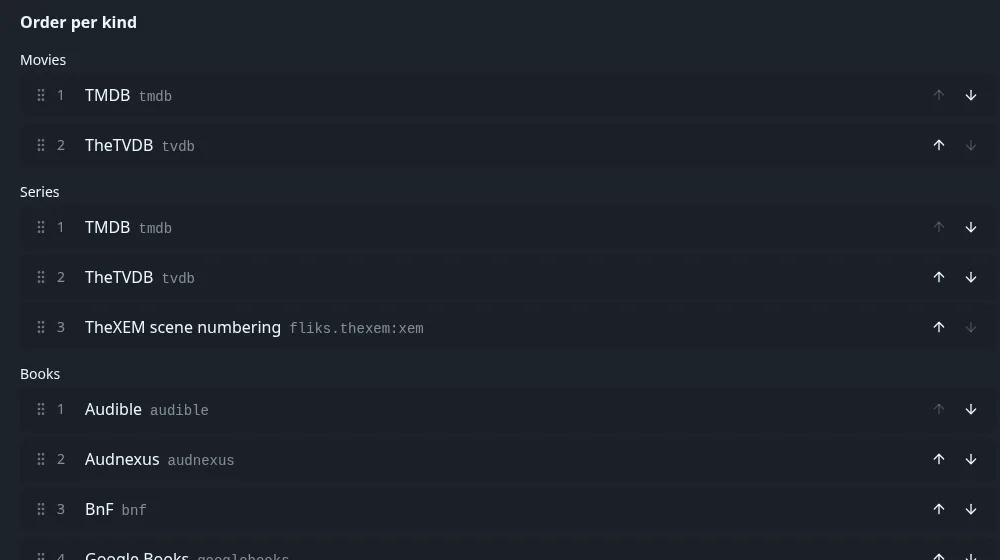
Below the table, Order per kind has one list per media kind (Movies, Series, Books, Albums, and Comics when a comics provider is installed). The first provider that has an answer for a title wins; the next ones fill what is missing. Defaults on a fresh install:
Default order per kind
| Kind | Order |
|---|---|
| Movies | TMDB, TheTVDB |
| Series | TMDB, TheTVDB, TheXEM scene numbering |
| Books | Audible, Audnexus, BnF, Google Books, OpenLibrary |
| Albums | Fanart.tv, LRCLIB, MusicBrainz |
Drag a row by its handle, or use the up and down arrows at the right of the row. The change is saved as soon as you drop it.
A library can also pick its own preferred provider (see Libraries); that choice goes first for that library.
See also#
- Metadata for matching, refreshing and fixing identifications.
- Plugins for installing more providers.
- Scheduled tasks and System for the nightly metadata refresh.