
Administration
Alerts to Discord, Slack and ntfy
Send Fliks events such as a new request or a finished download to Discord, Slack, ntfy, Gotify or a webhook.
Open Integrations > Notifications, click New connection, choose the service, paste its URL and keep the events you want. This posts to a chat service. For notifications on users' phones, see Push notifications.
Add a connection#
- Open Integrations > Notifications and click New connection.
- Name it and choose the Service type: discord, slack, webhook, gotify or ntfy.
- Paste the URL or token the service gives you. All events are ticked: untick what you do not want.
- Save, then edit the connection and press Send a test notification.
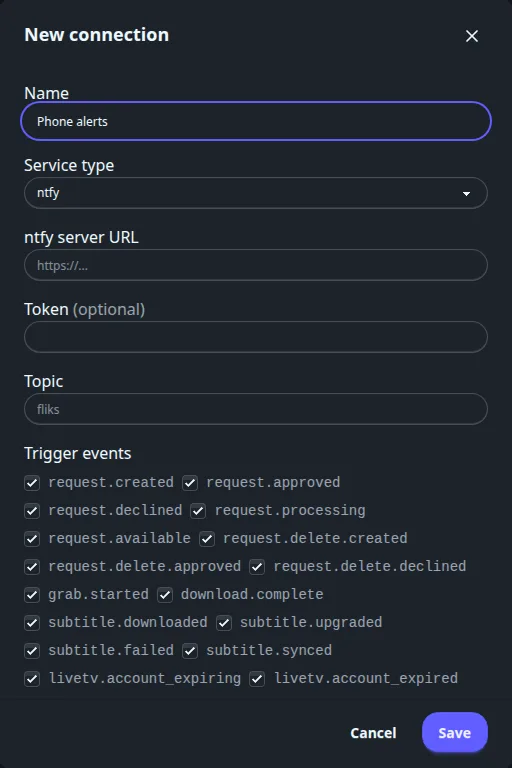
Every field of a notification connection
| Field | Meaning |
|---|---|
| Name | Required. |
| Service type | discord, slack, webhook, gotify or ntfy. The fields below change with it. |
| Webhook URL | Discord, Slack and webhook. The URL itself is the credential: it is stored hidden, and editing shows a mask. Leave empty to keep it. |
| ntfy server URL | ntfy only: the base address of your ntfy server. |
| Token | Not shown for Discord and Slack. Optional for ntfy (sent as a bearer token) and webhook (sent as an Authorization: Bearer header). Required for Gotify. Leave empty to keep the stored token. |
| Topic | ntfy only. Default fliks. |
| Trigger events | All ticked on a new connection. |
| Connection active | A switch; also in the list's Active column. |
| Send a test notification | Only when editing a saved connection. Shows success or the error. |
Each service gets a plain text message: Discord and Slack the text, Gotify a title Fliks - <event> and the message (priority 5), ntfy the message with the title header, and a generic webhook a JSON body {"event": "...", ...} with the event's fields (title, language and so on). Each send times out after 10 seconds and is not retried.
Every notification event
| Group | Event | Message |
|---|---|---|
| Requests | request.created |
New request |
request.approved, request.declined |
Request approved, declined | |
request.processing |
Request downloading | |
request.available |
Request available | |
request.delete.created, .approved, .declined |
The same three steps for a deletion request | |
| Downloads | grab.started |
Grabbing a release |
download.complete |
Download complete | |
| Subtitles | subtitle.downloaded, subtitle.upgraded, subtitle.failed, subtitle.synced |
Subtitle downloaded, upgraded, failed, synced, with the language |
| Live TV | livetv.account_expiring, livetv.account_expired |
A source's account expires soon, or has expired |
livetv.adult_guard_failed |
The adult-group restriction pass failed for a source | |
| Cleanup | media.leaving_soon |
A title will be removed soon, with the days left |
media.cleaned_up |
A title was cleaned up | |
| Optimization | optimize.completed, optimize.failed |
A file was optimized, or the optimization failed |
| Health | health.corrupt |
A corrupt file was found |
media.leaving_soon and media.cleaned_up come from Library cleanup.
Need retries and a delivery log for your own address?
The Notify plugin posts every event as JSON to one HTTPS address of yours, retries six times and keeps a log. Use it instead of the webhook type when delivery matters.
See also#
- Requests for the request events.
- Library cleanup for the cleanup events.