
Administration
Logs and troubleshooting
Where to find logs on each platform, and how to read the warnings Fliks logs about its own setup.
In-app log viewer#
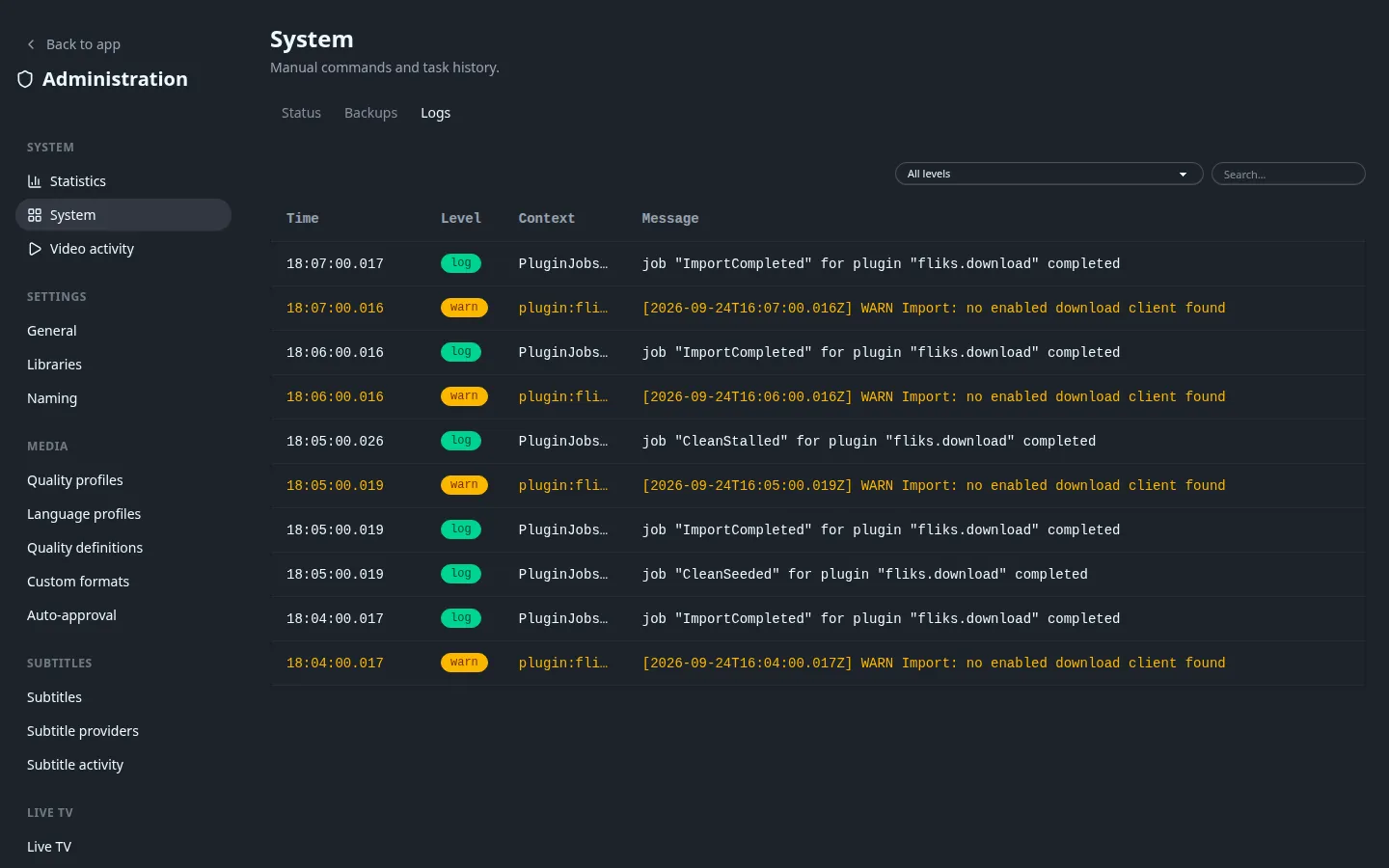
Settings > System > Logs shows the server's own recent log lines, newest first, filterable by level (Info, Warning, Error) and by a text search, refreshed every 5 seconds. The server keeps only the last 2000 lines in memory, and the page shows the 200 newest that match your filter. That buffer is reset on every restart. For anything older, or to see what happened around a crash, go to the platform log below instead. There is no log level setting: the server always logs at the same verbosity.
Where logs live per platform#
| Platform | Where |
|---|---|
| Docker | docker compose logs fliks (or docker logs <container>), same as any container: stdout/stderr, not written to a file inside the container by default. |
| Windows | %LOCALAPPDATA%\Fliks\logs\backend-YYYY-MM-DD.log, one file per day. The tray's View Logs… opens this folder directly. |
| macOS | ~/Library/Application Support/Fliks/logs/backend-YYYY-MM-DD.log, one file per day, plus PostgreSQL's own logs alongside. Backend lines are also visible in Console.app (subsystem app.fliks.macos). The menu bar's View Logs... opens this folder directly. |
| From source | Whatever the process's stdout/stderr is redirected to; Fliks doesn't write a log file itself outside of a packaged build. |
Warnings worth recognizing#
These are logged, not surfaced as errors in the UI, so they're easy to miss unless you're already looking at the log (search for the text in the in-app viewer):
| Message (start of line) | What it means | Fix |
|---|---|---|
No users found |
First boot, no accounts exist yet; Fliks created admin/password. |
Log in and change the password immediately; see Quick start. |
Cannot write to the data directory |
FLIKS_DATA_DIR isn't writable by the process; Fliks fell back to a temp directory. Artwork and avatars won't survive a restart. |
Fix the mount/permission, or set FLIKS_DATA_DIR to a writable path. |
Cannot write to the cache directory |
Same, for FLIKS_CACHE_DIR. Nothing is lost permanently (it's regenerable), just slower after every restart. |
Fix the mount/permission, or set FLIKS_CACHE_DIR. |
Cannot write to the plugins runtime directory |
The directory set by FLIKS_RUNTIME_DIR isn't writable, so Fliks used a temp directory. Harmless for your data: the plugin archives are stored in the database and unpacked again on every start. |
Fix the mount/permission, or point FLIKS_RUNTIME_DIR at a writable path. |
Cannot write to the JWT conf directory |
FLIKS_CONF_DIR (/app/conf in Docker) isn't writable, so a new signing key is generated on every restart and everyone is logged out each time. |
Fix the mount/permission, or set JWT_SECRET. |
HW accel test failed: <type> |
At startup Fliks tries each hardware path in turn and keeps the first that works; the tail of FFmpeg's own error follows on the same line. A failure followed by HW accel test passed for another path is normal. If every path fails, Fliks transcodes on the CPU. |
See Hardware acceleration for what each path needs (a device, a driver version, a container capability). |
GitHub release lookup failed: HTTP … |
The update check got an error answer from GitHub; harmless, retried on the next check. | Ignore, or set FLIKS_DISABLE_UPDATE_CHECK=1 if the server has no outbound internet access at all. |
Common startup failure: the database extension#
On every boot, Fliks runs CREATE EXTENSION IF NOT EXISTS pg_trgm (used for search) against the
configured database, and stops with an error if it fails, before the web server starts. With the
example Compose file this works out of the box, because the fliks Postgres role owns its own
database. Pointing Fliks at a database on a shared or externally managed PostgreSQL server can
fail here if that role isn't allowed to create extensions. Either have a superuser run
CREATE EXTENSION IF NOT EXISTS pg_trgm; once on that database, or grant the role the CREATE
privilege on it (pg_trgm is a trusted extension, so that is enough).
Health check endpoint#
GET /api/system/liveness is what Docker's own HEALTHCHECK polls (every 30 seconds, a generous
60-second grace period on startup, since a library scan can otherwise saturate a low-power CPU
and make an orchestrator think the container is unhealthy mid-scan). It needs no login and only
answers {"ok":true}: it's a plain liveness check, not a deep dependency check. Use the health
cards on Settings > System (Status tab) for database and plugin status instead.
Backup and restore failures#
pg_dump/psql errors on the Backups page surface the tool's own
last error line. The two common ones:
pg_dump is not available on this server: the PostgreSQL client tools aren't on the server'sPATH. The Docker image ships them. From source, install your distribution'spostgresql-clientpackage. The Windows and macOS apps don't put apg_dumpon the server'sPATH, so in-app backups there only work if a PostgreSQL client of a matching version is installed and on the systemPATH(on macOS, in/opt/homebrew/binor/usr/local/bin).- A version mismatch:
pg_dumprefuses to dump a server newer than itself. Keep the client tools at the same major version as the database server, or newer. The Docker image installs the current client from the PostgreSQL project's own repository, which covers the Postgres 18 server in the example Compose file.
See also#
- Backups for how to take and restore a database backup.
- Environment variables for every path that can be redirected.
- FAQ for the more common one-off questions.