
Built-in plugins
Plugin settings
Every option of Torrent manager, with its default: search time, stalled-download cleanup, seeding, cooldowns and where each one lives.
Open Settings > Torrent manager > General. Three things to know: pause downloads, how long a search waits, and cleanup of stuck downloads. Seeding limits are set on each indexer.
Open the settings#
In the admin sidebar, under TORRENT MANAGER, click General. Change what you need, then Save.
Options#
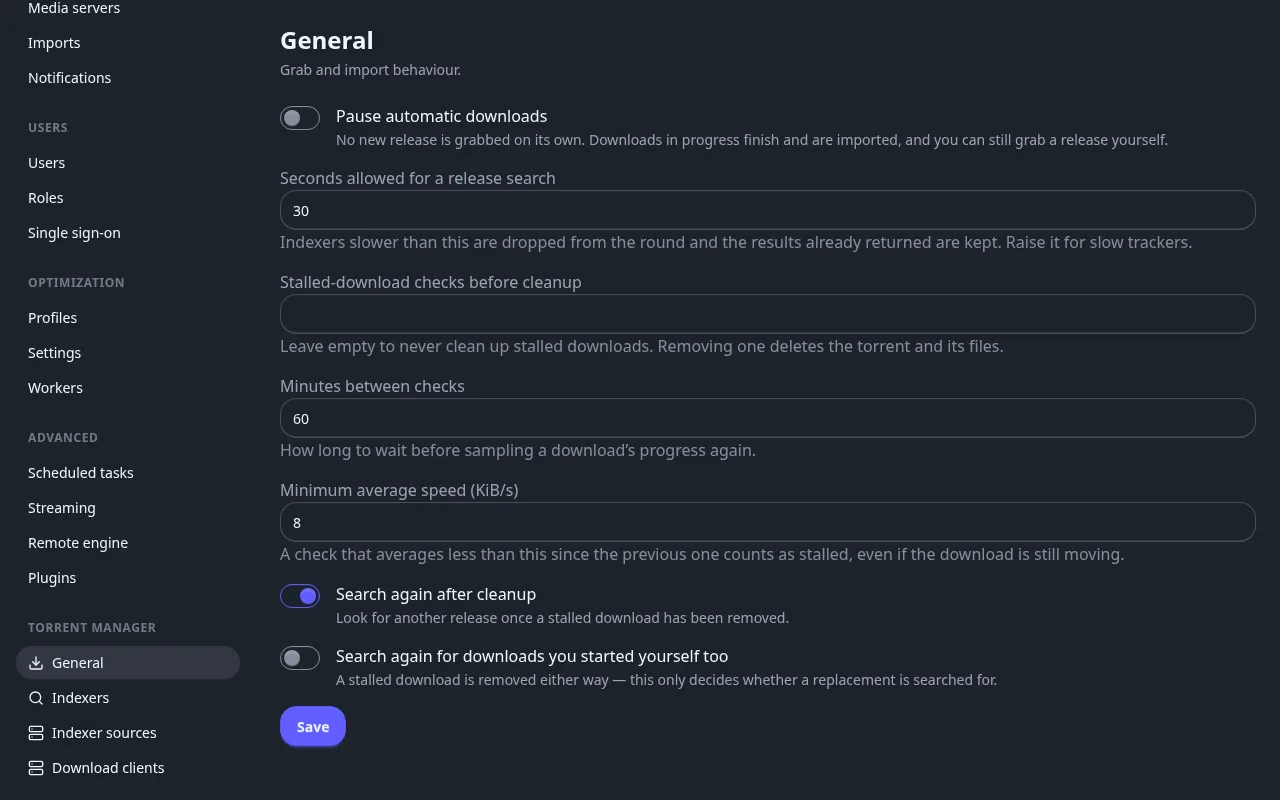
- Pause automatic downloads: stops new grabs. Downloads in progress still finish, and you can grab a release yourself.
- Seconds allowed for a release search (30): raise it if a slow tracker never shows up in the results.
- Stalled-download cleanup (off): set a number of checks to remove downloads that stopped moving and search another release. It deletes the torrent and its files.
Seeding#
Finished torrents keep seeding after Fliks copied the file, then are removed with their files once the tracker's limits are met. Set them on each indexer: Seed ratio target (1) and Maximum seeding days. On a private tracker, set them to its rules.
Reference#
Stalled-download cleanup in detail
| Option | Default | Range | What it does |
|---|---|---|---|
| Stalled-download checks before cleanup | empty (off) | 2 to 100 | How many consecutive failed checks remove a download. Empty never cleans up. |
| Minutes between checks | 60 | 5 to 1440 | The delay between two checks of the same download. |
| Minimum average speed (KiB/s) | 8 | 1 to 102400 | A check counts as failed when the download averaged less than this since the previous check, even if it is still moving. |
| Search again after cleanup | on | Look for another release once a stalled download has been removed. | |
| Search again for downloads you started yourself too | off | Searches for a replacement for downloads you grabbed by hand as well. A stalled download is removed either way. |
The plugin checks each unfinished download at most once per Minutes between checks. After Stalled-download checks before cleanup failed checks in a row it removes it: with 3 checks every 60 minutes, after about 3 hours without progress. Only downloads the plugin sent are touched, and the release is blocklisted.
How searches, imports and the blocklist work
- Search: the query is the title and its year. Each indexer is asked for the kinds of search ticked in its Use for: automatic, manual, or RSS (every 15 minutes).
- Import: once a minute, finished downloads are copied into the library with your naming rules. A download with no usable file is removed and blocklisted; Retry the import in the History row menu tries again.
- Blocklist: releases never grabbed again: removed from the Queue with Also blocklist this release, cleaned up as stalled, or holding no media file. No page lists it.