
Administration
System, statistics and scheduled tasks
The System group of the administration sidebar - Statistics, System, Video activity - and the Scheduled tasks page, with every task and what it does.
System is the control room. None of it is needed to watch, but System > System > Trigger a task is where you go when something did not update, and Advanced > Scheduled tasks lists every timed job with a run button.
| Page | Path | For |
|---|---|---|
| Statistics | System > Statistics | A landing page: counts and disk space. |
| System | System > System | Server health, restart, trigger a task, task history, backups, logs. |
| Video activity | System > Video activity | Who is watching now, and how. |
| Optimization queue | System > Optimization queue | See Optimization. |
| Playback quality | System > Playback quality | See Playback quality. |
| Scheduled tasks | Advanced > Scheduled tasks | Every timed job, and a run button. |
Statistics#
Statistics page: what it shows
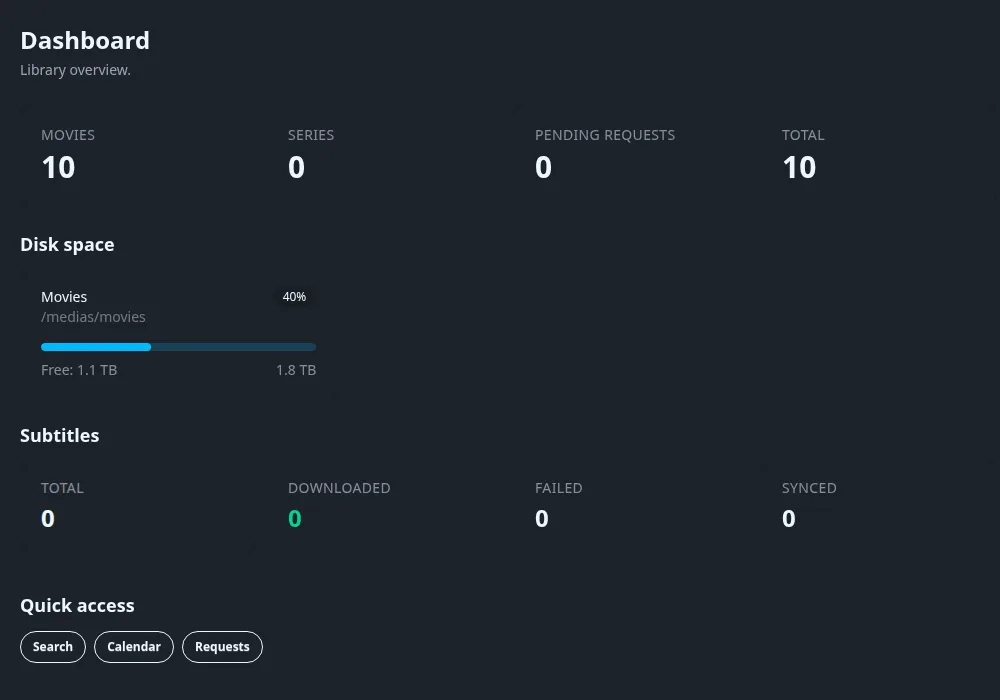
The page is called Dashboard in its header. It shows the number of Movies, Series, Pending requests and a Total; the Disk space of each library path (used share, free space and size); a Subtitles block with Total, Downloaded, Failed and Synced (the figures behind Subtitle settings); and Quick access buttons for Search, Calendar and Requests.
System#
System > System has three tabs: Status, Backups and Logs. The last two are covered in Backups and Logs and troubleshooting.
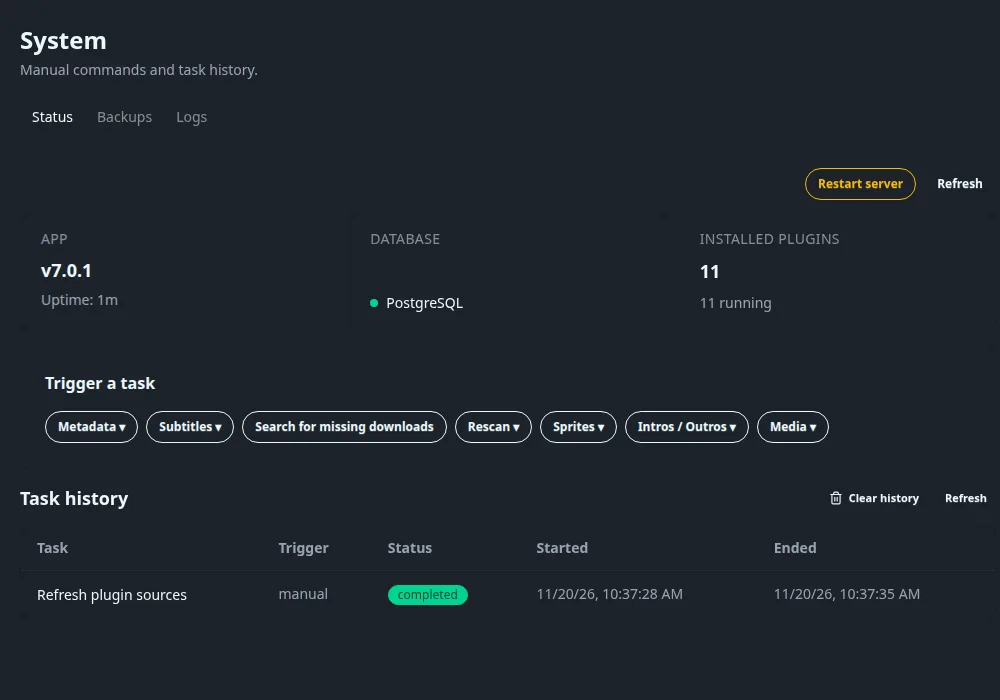
Status#
Status tab: every block
- APP: the version and the Uptime.
- DATABASE: the engine (PostgreSQL) with a status dot.
- INSTALLED PLUGINS: how many, and how many are running. See Plugins.
- Restart server: asks for confirmation (active playbacks may be interrupted, the server is down for a few seconds) and reloads the page by itself when the server is back. It only works when Fliks runs under something that restarts it, such as Docker.
- Refresh reloads the figures.
- Activity appears while jobs run, with progress per task and a note when more are waiting.
Trigger a task#
Buttons that open menus. Click one, then click an entry: the task starts at once and a row appears under Task history. Nothing is asked before it runs.
Open System > System, open a group in Trigger a task, such as Metadata, and click the task to run.
Every task you can trigger
| Group | Entry | What it does |
|---|---|---|
| Metadata | Refresh metadata | The nightly pass, now: refreshes identified titles that are due (settled titles refreshed in the last week are skipped). |
| Reload missing metadata | Titles missing a poster, overview or seasons, or not refreshed in about three months. | |
| Subtitles | Search for missing subtitles | One search pass for every missing profile language. |
| Upgrade subtitle quality | One upgrade pass. | |
| (single button) | Search for missing downloads | One pass of the download search. Needs the download plugin. |
| Rescan | Rescan all files | Rescans every title's files: new, changed and removed files. |
| Rescan missing files | Only titles with no file, or with files that have no parts yet. | |
| Sprites | Generate sprites | The seek thumbnails of every file, replacing existing ones. |
| Generate missing sprites | Only files without. | |
| Intros / Outros | Recompute all intros and outros | Detection for every season. |
| Detect missing intros and outros | Only seasons without markers. | |
| Media | The remaining scheduled tasks | Create a backup, Refresh plugin sources, Clean up the library, Follow new releases, and the three Live TV tasks. |
A group can also show jobs a plugin registered. Refresh plugin sources also applies automatic plugin updates, so expect installed plugins to move to the newest version when you run it.
Task history#
Lists recent runs with Task, Trigger (manual or scheduled), Status, Started and Ended. Clear history deletes completed, failed and canceled rows; running tasks are untouched.
Video activity#
Lists the playbacks in progress across all clients. It is the Transcoding dashboard: per stream the user, device, and for container, video and audio whether it is Direct Play, a bitstream copy or a transcode, plus buttons to send a message, pause, resume or stop. It also lists downloads in progress. Empty: No video activity in progress.
Scheduled tasks#
Advanced > Scheduled tasks lists each timed job. Click the play button at the end of a row to run it now.
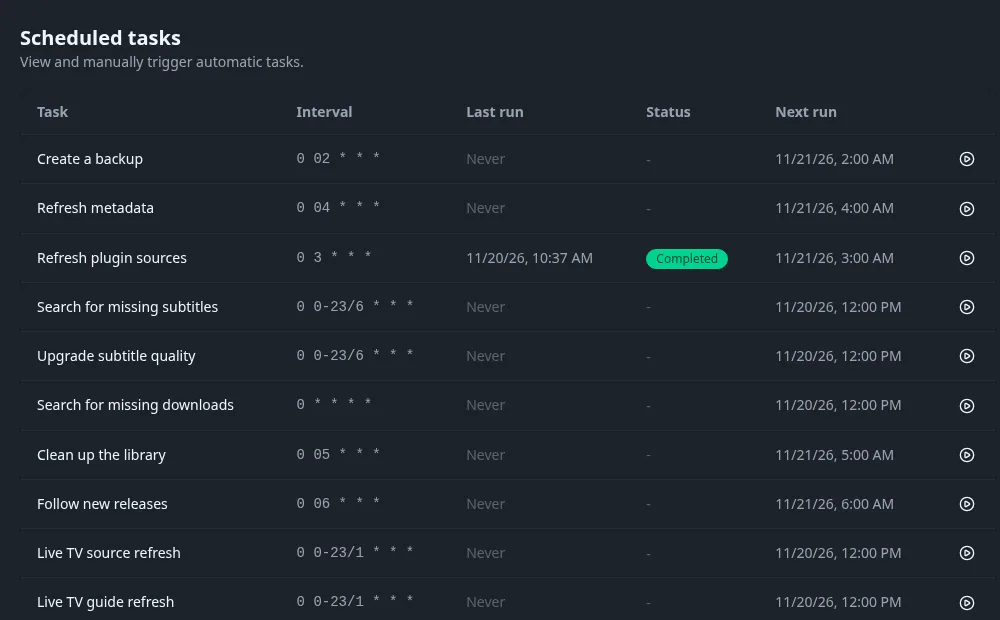
Scheduled tasks columns
| Column | Meaning |
|---|---|
| Task | The job's name. |
| Interval | A cron expression: minute, hour, day of month, month, day of week. Times are server time. |
| Last run, Status | When it last ran, and Completed, Running, Failed or Queued. |
| Next run | The next planned start. |
| Play button | Runs the task now (Trigger manually). A toast says Task ... triggered. |
Intervals cannot be edited here. For the subtitle tasks the real interval is the one in Subtitle settings, and the download search interval is on Settings > Downloads.
Every scheduled task and its schedule
| Task | Schedule | What it does |
|---|---|---|
| Create a backup | Daily 02:00 | Writes a database backup and prunes the oldest. See Backups. |
| Refresh metadata | Daily 04:00 | Refreshes the titles whose metadata is due and the scene numbering mappings. Needs a metadata provider. |
| Refresh plugin sources | Daily 03:00 | Refetches the plugin catalogues and applies automatic updates. Avoid running it casually. |
| Search for missing subtitles | Every 6 hours | Looks for subtitles in the missing profile languages. |
| Upgrade subtitle quality | Every 6 hours | Replaces subtitles scoring under the upgrade threshold when a better one exists. |
| Search for missing downloads | Hourly | Searches for wanted and upgradable titles through the download plugin. |
| Clean up the library | Daily 05:00 | Runs the cleanup rules: flags stale media and removes what is due. |
| Follow new releases | Daily 06:00 | Checks the artists, authors and series that users follow and adds their new releases. |
| Live TV source refresh | Hourly | Refreshes the channel list of each Live TV source. |
| Live TV guide refresh | Hourly | Refreshes the programme guide. |
| Live TV guide cleanup | Daily 01:00 | Removes old programme entries. |
A plugin that registers jobs adds its own rows. A hidden housekeeping job also runs daily at 03:00 and is not listed.