
Administration
Remote engine
Settings > Remote engine - point the server at a streaming engine running on another machine.
Only needed if you run the streaming engine on another machine, for instance a GPU box. Leave every field empty otherwise. Fill Engine URL and Bearer token in Settings > Advanced > Remote engine, press Test connection, then Save.
The engine is the component that probes files and produces the streams (Direct Play, remux, transcode). It normally runs next to the server, inside the same container or process, and you never configure it. Settings > Advanced > Remote engine is for the other case: an engine on a different machine, for instance a GPU box.
Open Advanced > Remote engine, fill the fields, press Test connection, then Save.
Fields#
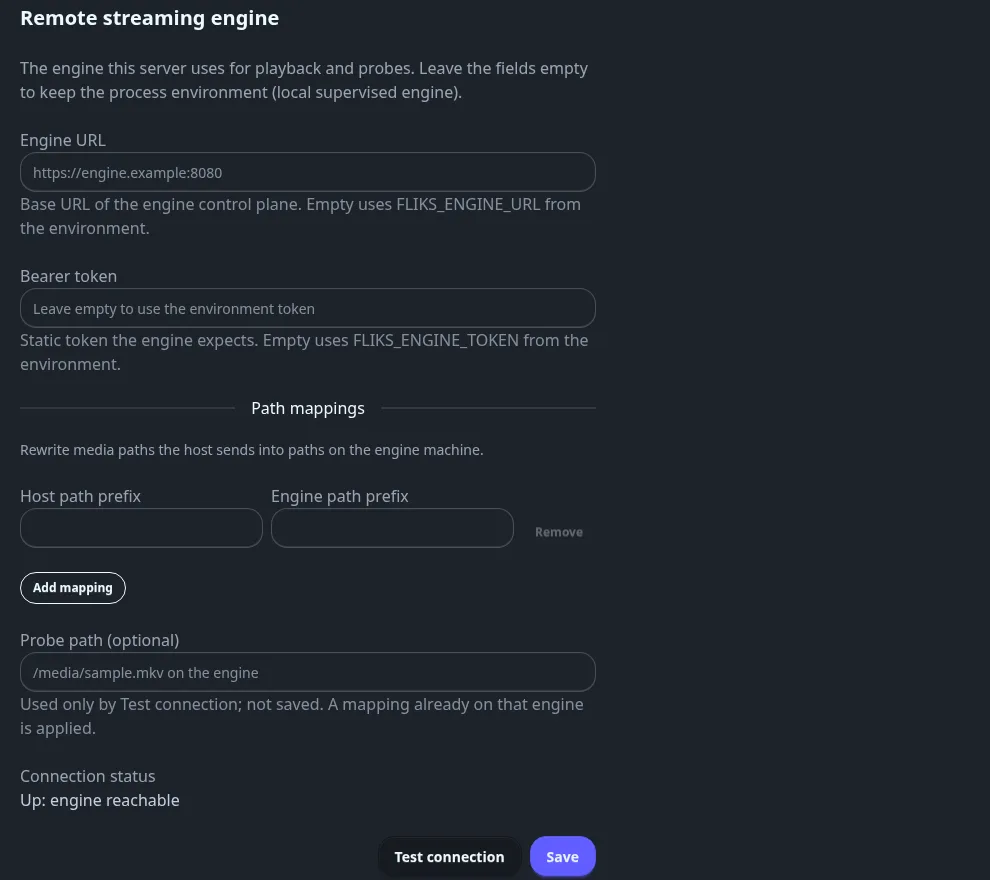
Every field, path mappings and connection status
| Field | Meaning |
|---|---|
| Engine URL | Base URL of the engine's control plane, such as https://engine.example:8080. Empty uses the FLIKS_ENGINE_URL environment variable (the local supervised engine). |
| Bearer token | The static token the engine expects. Empty uses FLIKS_ENGINE_TOKEN. |
| Path mappings | Pairs of Host path prefix and Engine path prefix. They rewrite the media paths the server sends into the paths where the engine sees the same files. Add mapping adds a row, Remove deletes one. |
| Probe path (optional) | A file path on the engine, for example /media/sample.mkv. Used only by Test connection, never saved. A mapping already saved on that engine is applied. |
| Connection status | Up: engine reachable, Down: engine unreachable or Off: not configured or not connected. |
| Test connection | Reports the engine's name and protocol version and, if you gave a probe path, whether the probe worked. |
| Save | Stores the three fields above. |
The engine and the server must see the library at paths that match: either the same mount points, or mappings that translate one into the other.
If the video is still forwarded to another address after saving, the page says so: restart the NAS engine with its upstream option set to the saved URL, or clear the URL to go back to the local engine.
See also#
- Environment variables for
FLIKS_ENGINE_URLandFLIKS_ENGINE_TOKEN. - Hardware acceleration: acceleration is a property of the machine the engine runs on.
- Optimization for remote encoding workers, a different mechanism.