
Administration
Settings
A map of the admin area, section by section, with where each setting actually lives.
Getting there#
Open the user menu and pick Administration. The entry only shows up when your account has
settings.access, and never on a TV: the admin area isn't available there. These docs write
paths into it as Settings > ..., for example Settings > Users.
The sidebar is organized into fixed sections. A few items only appear once you hold the matching
permission (Users needs users.manage, Roles needs roles.manage, Subtitle activity needs
media.read), and an installed plugin that adds pages gets its own section at the bottom, named
after the plugin.
System#
| Page | What it's for |
|---|---|
| Statistics | Library counts, pending requests, disk space: the admin landing page. |
| System | Three tabs. Status: server health (app version, uptime, database, running plugins), running and queued activity, recent commands, and a Restart server button when Fliks runs under a supervisor that can bring it back (Docker, for instance). Backups: see Backups. Logs: see Logs and troubleshooting. |
| Video activity | The live Transcoding dashboard: who's watching what, and on which hardware path. |
Settings#
| Page | What it's for |
|---|---|
| General | The setup checklist; the server name shown in client apps; the Public address Chromecast uses to reach streams (set it when Fliks sits behind a reverse proxy, leave it empty otherwise); metadata language and region; and import automation (detect intros and credits, generate seek thumbnails). |
| Libraries | Add, edit or remove libraries: a disk path, a media type, and who can access it. See Libraries. |
| Naming | The template used to rename a file once it's grabbed and imported. |
Media#
Quality profiles, language profiles, quality definitions (size limits per quality, in MB per hour of content, shared across every profile), custom formats (scoring rules layered on a profile), and auto-approval rules all live here. They only matter once you've installed the download plugin; see Requests for how they fit together end to end.
Subtitles#
Subtitle search settings, subtitle providers (including translation sources), and subtitle activity (a log of what was found, downloaded, synced or translated, and what failed). See Subtitles.
Live TV#
One page with tabs for Sources, Channels, Guide, Settings, Access and Health, fully covered in Live TV.
Integrations#
| Page | What it's for |
|---|---|
| Media servers | Notify another self-hosted media server pointed at the same files to refresh its own library when Fliks adds something new. |
| Imports | A manual disk (re)scan tool, plus importing a library, watch history or pending requests from the media manager, media server or request manager you're migrating away from. |
| Notifications | Send events (new downloads, failures, and so on) to Discord, Slack, ntfy or a similar service. |
Users#
Users and permissions: accounts, roles, and library access.
Advanced#
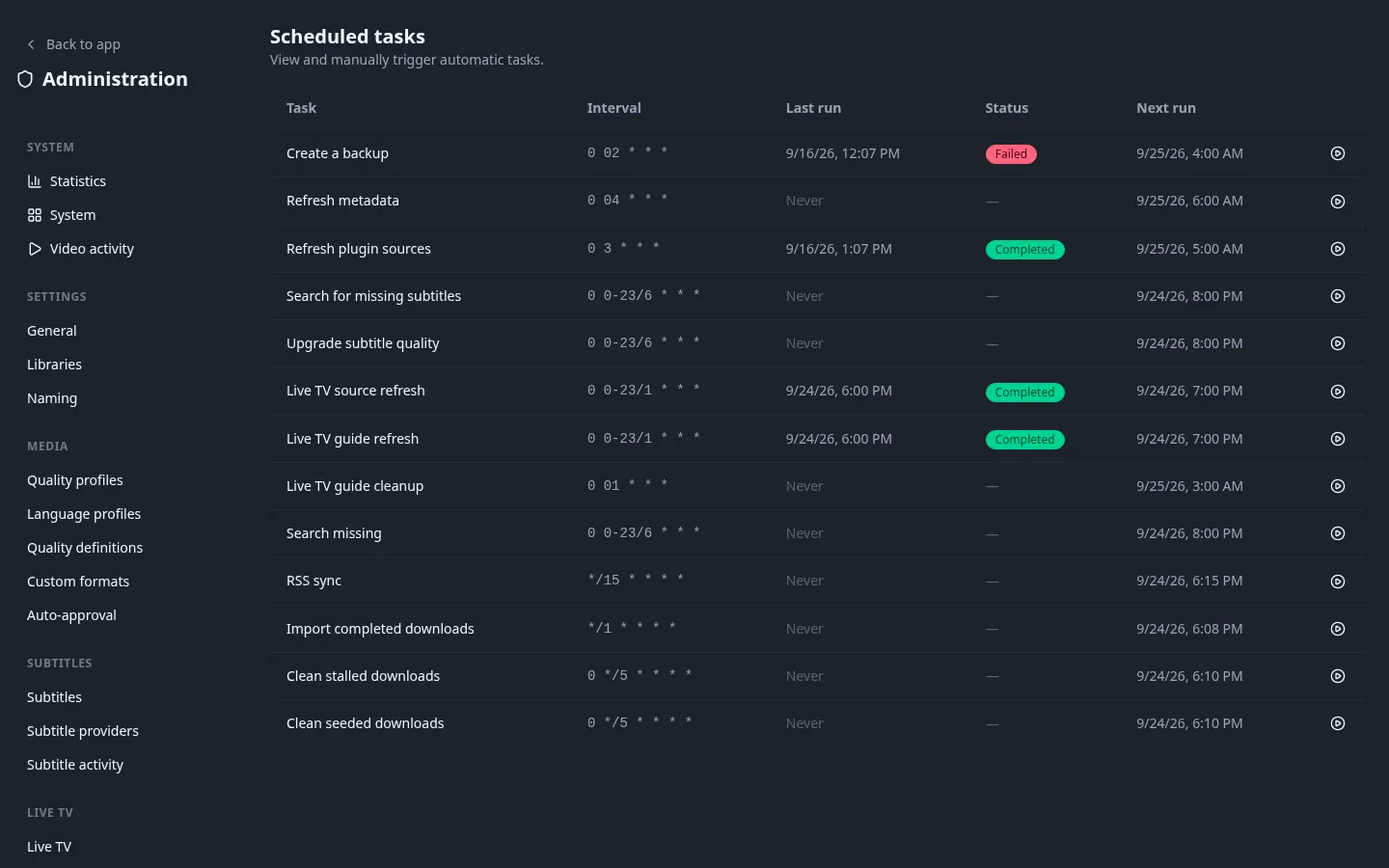
| Page | What it's for |
|---|---|
| Scheduled tasks | Every background job Fliks runs on a timer (the daily backup, metadata refresh, plugin source refresh, subtitle search and upgrade, plus any job a plugin adds), with its interval, last and next run, and a button to run it now. Intervals are fixed; they can't be edited here. |
| Streaming | Segment duration, encoding preset, automatic black bar cropping, HDR to SDR tone-mapping algorithm and curve, when embedded subtitles are extracted, transcode cache size limit and retention (plus a Clear cache button), concurrent background FFmpeg jobs, GPU selection on a multi-GPU host, and what the "Auto" quality does (Direct Play first, or adaptive streaming first). See Hardware acceleration and Streaming and transcoding. |
| Plugins | Install, update and configure plugins. See Plugins. |
See also#
- Environment variables for the handful of values that are set before the server starts, rather than from this area.