
Features
Requests
Let household members ask for a title to be added, or for one to be removed, without giving them direct control over the library.
Asking for something to be added#
Anyone with request permission can search for a movie or series (from the same search used to browse metadata) and submit a request instead of adding it to a library directly. A request carries:
- The title, and which library it should land in.
- A quality profile and a language profile to use for it.
- For a series, which seasons are wanted (a request for only part of a series is possible).
The library picker is skipped automatically when there's only one library to choose from. When asking for more seasons of a series that's already requested or in the library, the quality and language profiles are the ones already set and can't be changed.
Statuses#
| Status | Meaning |
|---|---|
| Pending | Waiting for someone with permission to approve or decline it |
| Approved | Accepted; the title is now being monitored |
| Processing | A release has been grabbed and is being downloaded |
| Downloaded | The requested files are on disk |
| Declined | Turned down, optionally with a reason |
| Failed | Could not be carried out (in practice only seen on requests imported from another tool) |
Once a request is approved, its badge shows whether the title is monitored, and switches to a live view of the download itself once one is in progress (searching, queued, downloading with a percentage, stalled, paused, or importing), so a requester can watch their request move without leaving the page.
Approving and declining#
Making a request needs the Create requests permission; approving and declining needs Manage requests. A moderator only sees requests aimed at libraries they can access themselves (plus requests that have no library yet), so restricting someone's library access also limits which requests they moderate. Declining takes an optional reason, shown back to whoever made the request.
A request still in flight (pending, approved or processing) is automatically declined if the title it points to gets unmonitored or removed from the library. For a request covering several seasons, unmonitoring one season just drops that season from the request.
Each requester can edit (library, quality and language profile) or cancel their own request only while it's still pending; anyone with Manage requests can remove a request at any point.
Limits per user#
Two quotas, set per user: how many movie requests and how many series requests they can make within a rolling window (7 days by default, also set per user). Set either to 0, the default, to make it unlimited. Only pending and approved requests count.
A new request for a title that anyone already has an active request for (pending, approved, processing or downloaded) is rejected outright. The exception is a series, when the new request asks only for seasons no other active request covers and nobody has requested the whole series.
Auto-approval rules#
Instead of reviewing every request by hand, an admin can define rules under Settings > Auto-approval that approve matching requests immediately. A rule is a set of conditions, and every condition it sets has to match for the rule to fire:
- Specific users, or specific roles (either one is enough)
- Movie or series
- Specific libraries
- Specific genres (the title needs any one of them)
- A maximum number of seasons (for a series request; a whole-series request counts all of the show's seasons)
- A release year range
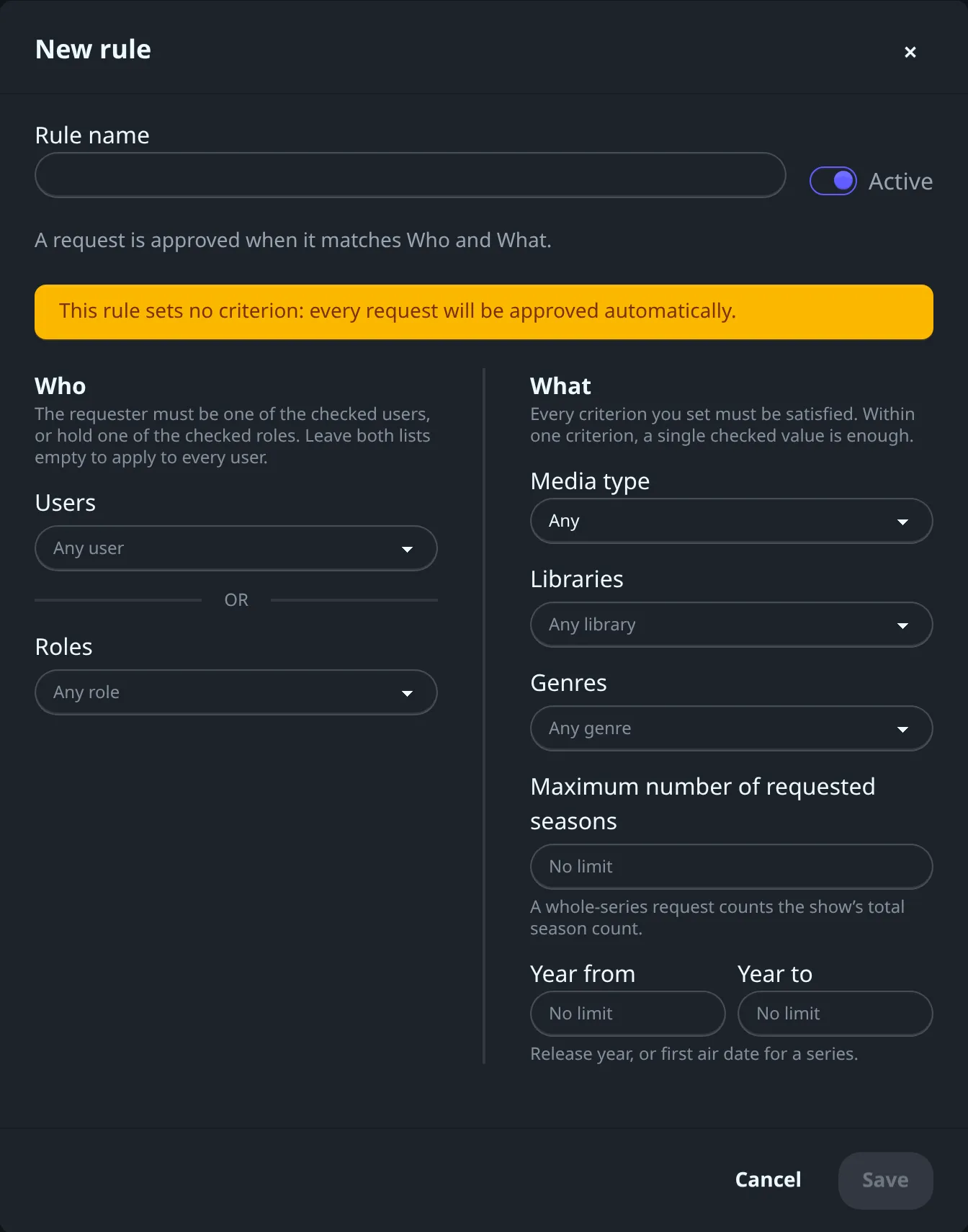
A condition left empty matches anything, so a rule with nothing set approves every request it sees. A condition Fliks can't check (for example, the title's details can't be fetched) counts as not matching. Any one enabled rule that matches is enough to approve a request; there's no need for all of them to agree.
Requesting a deletion#
A user with request permission, but without permission to delete media outright, can ask for an existing title to be removed instead: Request deletion on its detail page, after a confirmation. Only one deletion request per title can be pending at a time, and this kind of request is never auto-approved, and doesn't count toward the quotas. Approving it removes the title from the library and deletes its files from disk, exactly as if an admin had deleted it directly.
What happens after approval#
Fliks itself doesn't search anywhere for the file: approving a request marks the title as monitored and hands it to whatever acquisition plugin is installed, such as the download plugin (see Plugins). The request moves to Processing once a release is actually being grabbed, and to Downloaded once the files for everything it asked for have landed on disk.
Requests need an acquisition plugin installed to ever leave the Approved state on their own; see Settings > Plugins. Without one, an admin can still add the title to the library by hand: matching open requests are linked to it (a pending one is approved on the spot) and move to Downloaded once its files are on disk.